| # | Creator | Model | Followers | Avg Views | Viral Posts | Max Views | Posts |
|---|
Sunny Angels — TikTok Intel Tool
Welcome to the Sunny Angels TikTok Intel Tool. This dashboard helps you find and create viral slideshow content. Discover trending posts, pick the right sounds, and generate daily post ideas — everything in one place.
Your quality matters. The more effort you put into picking the accounts you send (real competitors, niche-relevant, actually viral), the sharper this tool becomes and the easier your daily work gets. Sending random junk = junk data = worse suggestions for YOU. Take the account submissions seriously.
Golden Rules
These rules apply to everything you do on TikTok. Breaking them can permanently damage an account. Every team member manages 5 TikTok accounts for their assigned creator. All 5 accounts are equal — they all post slideshows. Your goal is to build 5 strong winner accounts.
- Shadowrocket must be ON before you open TikTok. Every single time.
- NEVER turn off Shadowrocket while logged into any TikTok account.
- NEVER answer DMs. Ignore all direct messages. Zero exceptions.
- NEVER post content outside the posting window (5 AM – 1 PM PH Time).
- NEVER use non-US locations, non-US sounds, or non-English text.
- ALL content must be in English — American English only.
- ALL accounts must look like a young American woman.
- NEVER share login data, screenshots, or guide content with anyone outside the team.
- NEVER interact with your own other TikTok accounts from the same phone.
⏰ Posting Window
✅ ALWAYS DO
- Check Shadowrocket is connected before opening TikTok
- Post during the US posting window (5 AM – 1 PM PH)
- Use American English
- Check eligibility after posting
- Remove image location data before posting
- Post stories daily on all accounts
- Use new image sets as priority
❌ NEVER DO
- Post bikini or revealing content on new accounts
- Use the same content on multiple accounts
- Interact with your own other accounts
- Answer any DMs
- Use non-US sounds or non-English text
- Panic-post if you think you are shadowbanned
- Delete slideshows with low USA% — make them PRIVATE instead
Profile Setup
Before you post anything, every account must have a complete and professional profile. TikTok checks profile completeness as a trust signal.
🖼️ Profile Picture
📝 Username
Your username must look real. No random numbers. It should look like a real person's account.
✅ DO
- Use creative names that feel natural (e.g., sweetxbella, cloudyjosie)
❌ DON'T
- Do NOT use names with random numbers (e.g., user38291)
✏️ Bio Structure — Under 1,000 Followers
Until your account hits 1,000 followers, TikTok does NOT let you add a clickable link. So you send traffic to the main account (which already has the link). Your bio follows this exact 3-line structure:
IG: sweetxbella
the real stuff is on my main ⬇️
@bellasmain
IG: cloudyjosie
curious? my main has all the answers 🔓
@josiesmain
🔗 Bio Structure — 1,000+ Followers (Link Unlocked)
Once your own account reaches 1,000 followers, TikTok unlocks the clickable link in your bio. At this point you switch the flow:
IG: sweetxbella
the real stuff is right here ⬇️
🔗 [link in bio]
No more @tag. The link replaces it.
- The CTA must always push traffic to the destination (main account under 1k, own link over 1k).
- Style: flirty, playful, curious, exclusive.
- Keep it natural, no corporate vibe.
- Use max 1–2 emojis per CTA. Only use: ⬇️ 👇🏻 🔗 🔓
- Always use the link provided by your supervisor. Never use your own links.
🎭 Bio Personality
The bio must match the creator's personality and niche. Ask yourself: would a real girl who looks like her actually write this?
✅ DO
- Match the vibe: goth = dark/mysterious, cute girl = soft/sweet, baddie = bold/confident
❌ DON'T
- Do NOT write bios that feel AI-generated, too long, or too generic
Account Creation & Warm-Up
When you create a new account, TikTok watches everything closely. One mistake and your account gets shadowbanned before it even starts.
📱 Creating a New Account
- Contact your supervisor immediately.
- Your supervisor will guide you through what to try — there are several things to test before a phone reset is needed.
- Do NOT keep mass-creating accounts in the same session if one got banned.
🔥 Warm-Up Phase (24 Hours)
After creating the account, you must warm it up for 24 hours before posting. This teaches TikTok that your account is a real person, not a bot.
🛡️ Content Rules for New Accounts
- Do NOT post seductive or revealing pictures (bikini, too much skin, suggestive poses).
- TikTok will immediately flag your account if you start with bold content.
- Start with safe, normal pictures.
- You can post more bold content later once the account has trust.
Testing Phase
This phase applies only to newly created accounts. For the first 3 days, we test harder so we can immediately see if the account is good.
📋 Testing Schedule
- Upload slideshow 1 → Wait 5 minutes
- Upload slideshow 2 → Wait 5 minutes
- Upload slideshow 3 → Wait 5 minutes
- Upload slideshow 4 → Wait 5 minutes
- Upload slideshow 5
Do this for 3 days. After 3 days, go to normal posting (3 slideshows per day).
📈 How to Judge Results After Testing
- Most posts get 200+ views.
- Maybe one post is already going viral.
- No "not eligible" posts sitting on the profile.
- Analytics show views from "For You" feed.
- High USA percentage (90%+).
If your account looks like this after 3 days = you have a WINNER. Move to normal posting (3 slideshows per day).
- Multiple posts under 100 views.
- Several posts marked "not eligible".
- No growth after 3 days.
- Views only from "Personal Profile" (not from For You).
- Low USA percentage.
If your account looks like this = report it. We replace and start fresh.
Normal Posting Schedule
After the testing phase, you switch to normal posting. This is your daily routine for all 5 accounts.
📅 Daily Posting Schedule
- Always wait 5–10 minutes before posting the next slideshow.
- Rotate between your 5 accounts.
- Post during 5 AM – 1 PM PH Time only.
- Never post all slideshows at once. TikTok will think you are a bot.
⚡ Use the Generator — Your Daily Workflow
You now have a Generator tab in this tool. The Generator picks fresh viral posts for you every day and cycles the content so you are not posting the same style over and over. This is the fastest way to keep your feed varied and on-trend.
- Open the Generator tab.
- Set the number of accounts you run (1–5) and a time period.
- Click Generate Daily Posts — you'll get 3 picks per account.
- Review every suggestion. Does it actually fit your creator? If not, click Reroll to get another option.
- If a suggestion is close but not perfect, take it and adapt it (change wording, shift details, swap images).
📝 Work Smart — Build Drafts First
The cleanest way to run your 5 accounts is to plan content in advance as drafts, then just hit Post when the window opens.
- Once a day, sit down and plan all slideshows for the day (ideally the day before).
- Build every slideshow as a Draft in TikTok — pictures loaded, text overlays placed, caption + hashtags drafted, sound selected.
- When the posting window opens (5 AM – 1 PM PH), you just open the draft and post it one by one with 5–10 min gaps.
- This lets you focus 100% on posting + engaging during the prime-time window, instead of building content under pressure.
🖼️ Slideshow Content Rules
📈 Algorithm Ranking (What TikTok Cares About)
✍️ On-Screen Text
✅ DO
- Place text in the center or clearly visible area — not in corners
- Use different text styles for each slideshow
- Rotate topics: questions, statements, teases, quotes
❌ DON'T
- Do NOT use the same text on every slideshow
- Do NOT post sad or depressing content — keep the vibe positive and confident
📱 Stories (MANDATORY)
- Stories keep your account active and visible.
- Post simple photos as stories — no links needed.
- Use trending music on your stories.
- Make sure stories are in 9:16 format.
- This is NOT optional. Do it every day.
📊 Post Limit — Private vs Delete
- Make it PRIVATE when a post performed okay but you need space / the creator-fit isn't great anymore. Private is ALWAYS safer than delete.
- Only DELETE posts that are under 100 views. Those are dead weight and fine to remove.
- Never mass-delete everything at once — it looks suspicious to TikTok.
Eligibility Check
After EVERY post, you MUST check if it is eligible for the For You Page. Do this 15–30 minutes after posting.
🔍 How to Check Eligibility
📋 What To Do — New Policy
New rule: delete instead of appeal.
Content Rules & Adapting
Reposting and adapting is a key strategy for TikTok growth. You must do it correctly every time.
✅ DO
- Adapt the content — change wording, make it fit your creator's style
- Change text position — shift overlays to different spots on the image
- Use your own images — always use photos of your assigned creator
- Use high-resolution images only — no blurry, compressed, or low-quality photos
- Repost proven high-performing content first, then test new ideas
- Track which posts perform well so you know what to repost
❌ DON'T
- Copy 1:1 — TikTok detects duplicates and suppresses them
- Use screenshots from phone — iMessage, Notes app screenshots get flagged
- Use non-English content — all text must be American English
- Post outside the posting window — only post during US prime time hours
- Upload the same slideshow to multiple accounts
- Repost the same content back-to-back on the same day
🔄 When to Repost
🔄 Things You Must Adapt
- Hair color mentions — If the original says "brunettes do it better" but your creator is blonde, change it to match
- Personal details — Names, ages, specific stories need to be made generic or adapted
- City names — Replace specific city references with broader ones or remove them
- Perspective (male to female) — Some trending posts are from men's accounts. Flip the perspective so it reads as if a woman is posting it
👨 Posts from Male Creators
Some of the most viral content comes from male accounts. You can absolutely use these — but you must adapt the perspective. Change "my girlfriend" to "my man" or "my boyfriend." Change "as a man" to "as a woman." Make it sound natural from your creator's point of view.
🧑 Posts About Specific People
Some viral posts reference specific people, celebrities, or inside jokes. Make it generic — replace names with "your best friend," "your man," or "that one person." The underlying emotion is what makes it viral, not the specific reference.
⚠️ Content Quality Rules
- Do NOT repeat the same post style over and over. Vary poses, locations, outfits, moods.
- Do NOT post visually similar slideshows back-to-back.
- Do NOT use the same outfit in consecutive posts. Space them out at least 3–4 posts.
- Do NOT post content that feels sad, depressed, or negative.
- Do NOT mix landscape and vertical images in the same slideshow.
🖼️ On-Screen Text — Size & Aesthetics
The #1 reason your slideshows don't look aesthetic and don't go viral is simple: the text is way too big. Almost every worker makes this mistake. Big text looks cheap, covers the creator's face, and kills curiosity. Smaller text that sits clean on the image looks premium and performs better.
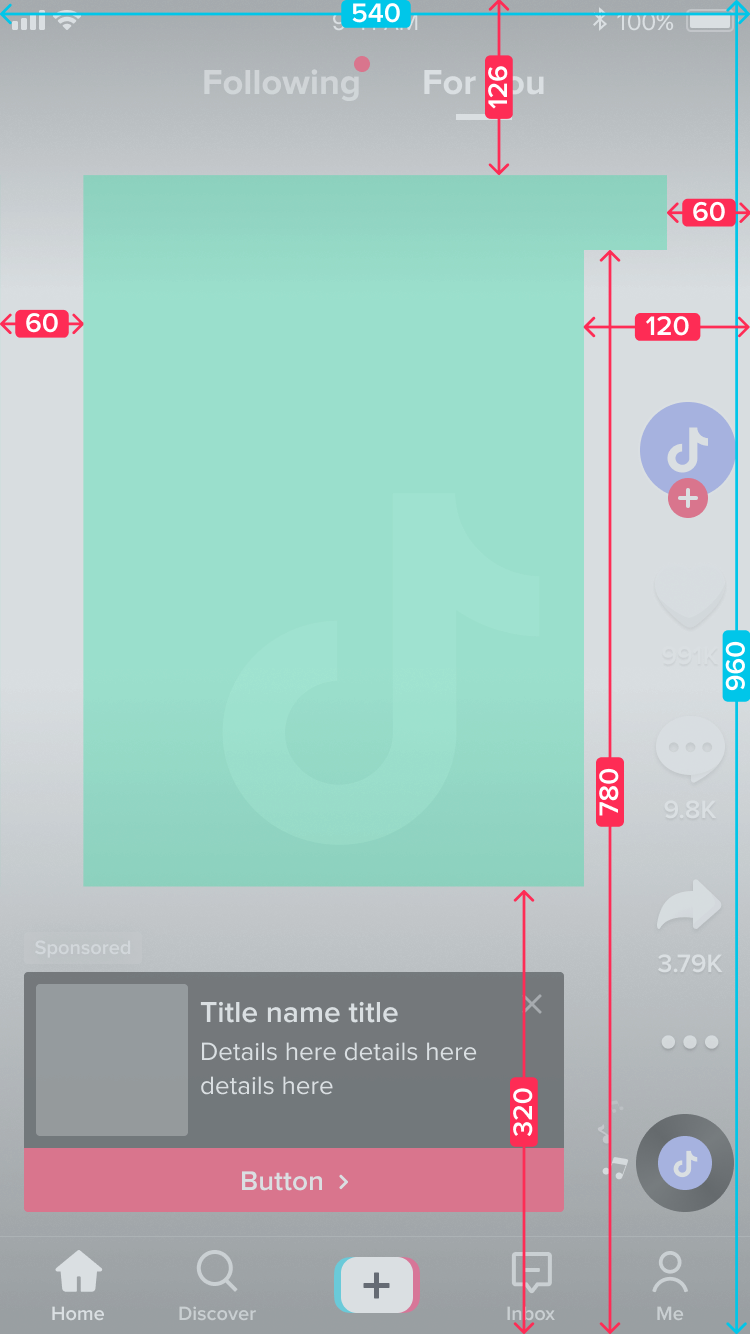
✅ Good Example
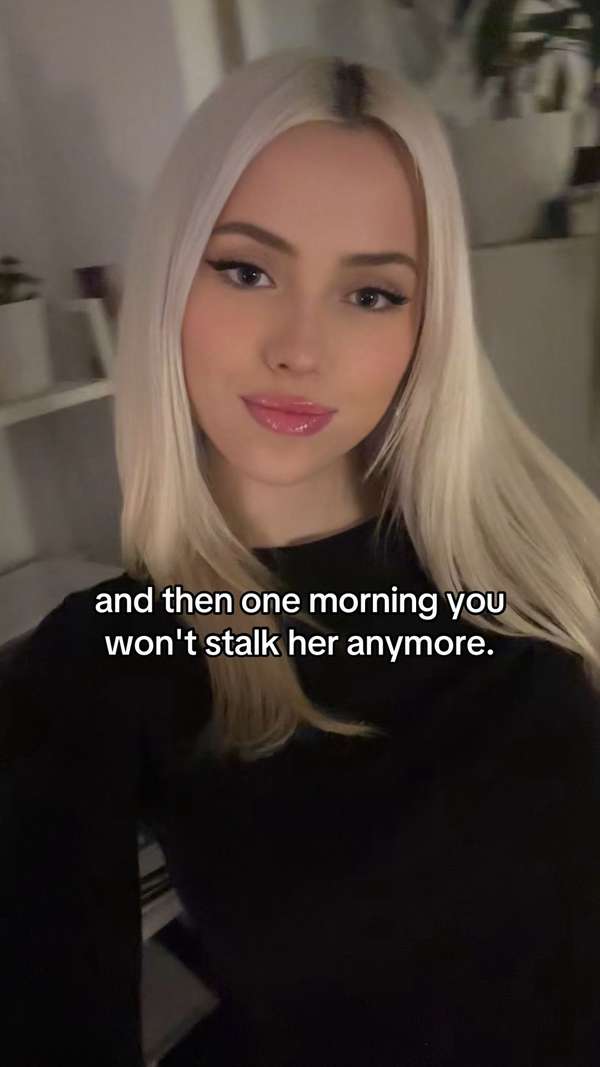
❌ Bad Examples — Don't Do This
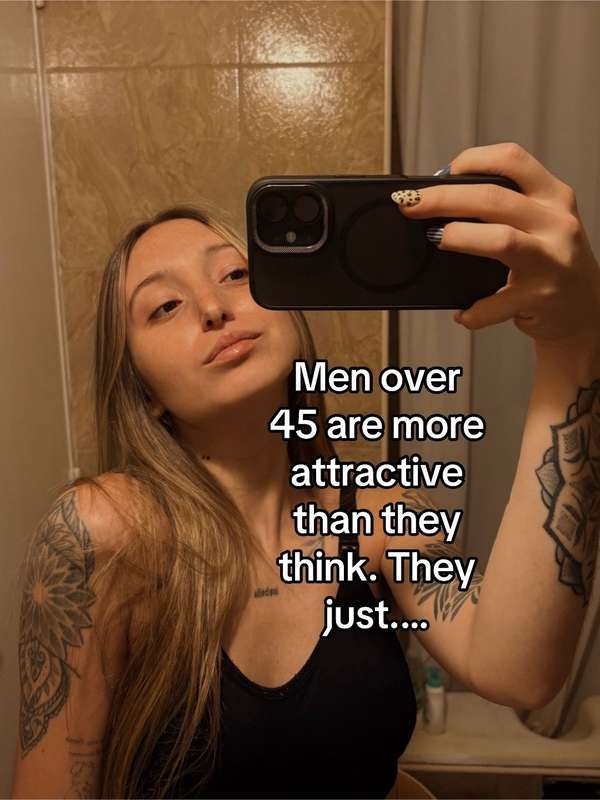
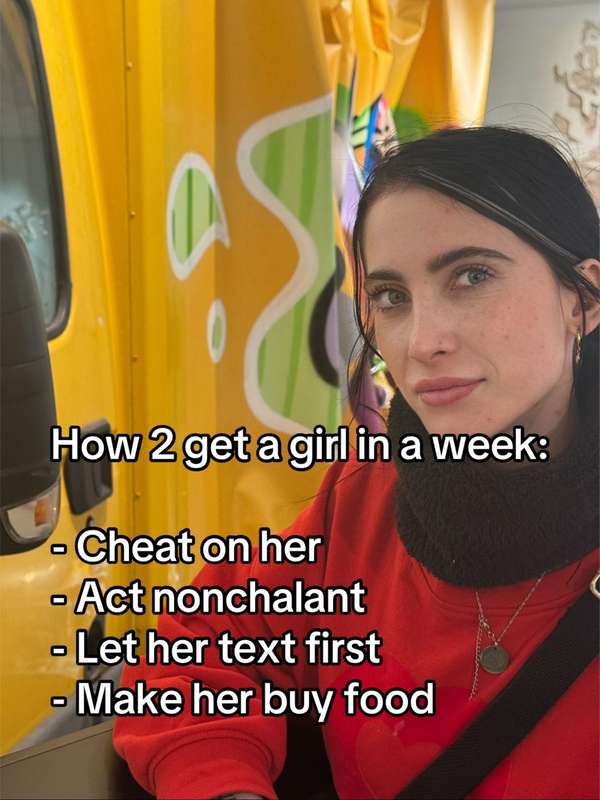

- Shrink the text before you post. When in doubt, go one size smaller.
- Keep it inside the safe zone — not stretched across the full width.
- Don't cover the creator's face or body with text.
- Break long text into a second slide instead of cramming + enlarging.
- You can't always hit this perfectly — but always try. Aesthetics = more watchtime = more reach.
📐 Crop Images to Fullscreen (9:16)
Whenever the photo allows it, crop your images to fill the entire screen. Fullscreen slides look cleaner, show more of the creator, and feel higher-quality. Always eyeball the original first — if cropping cuts off important parts (face, body, a key detail), leave it as it is.
Step 1 — Open Crop
In the TikTok editor, tap Crop on the right-side toolbar.
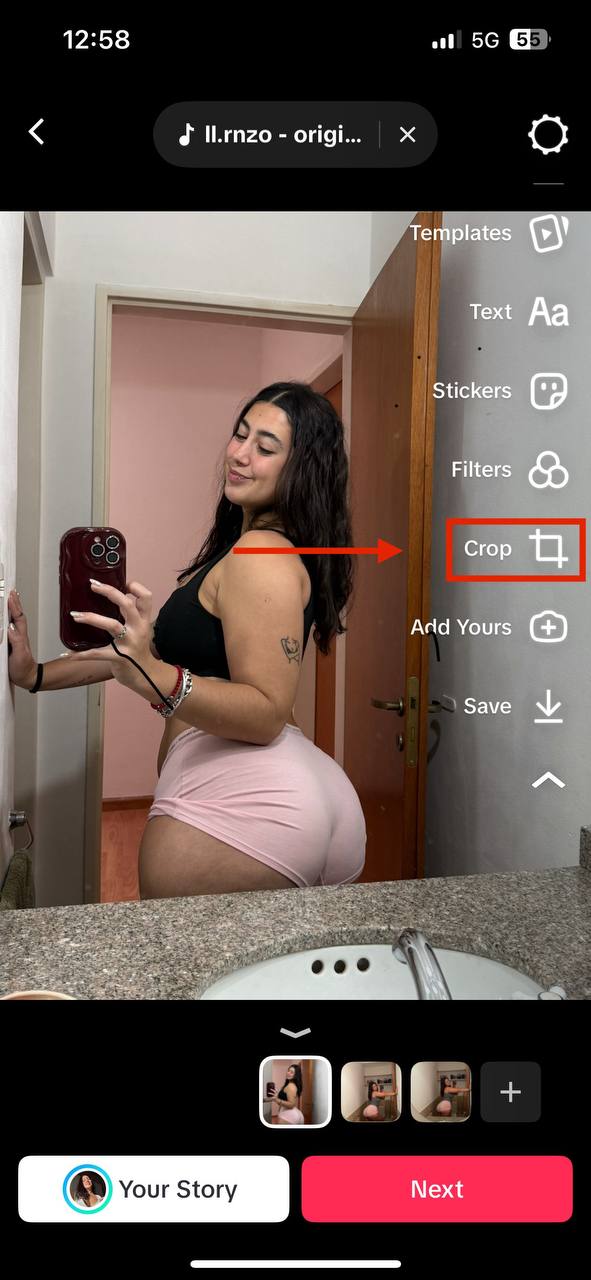
Step 2 — Pick 9:16
Select the 9:16 ratio at the bottom. That's the full TikTok screen.
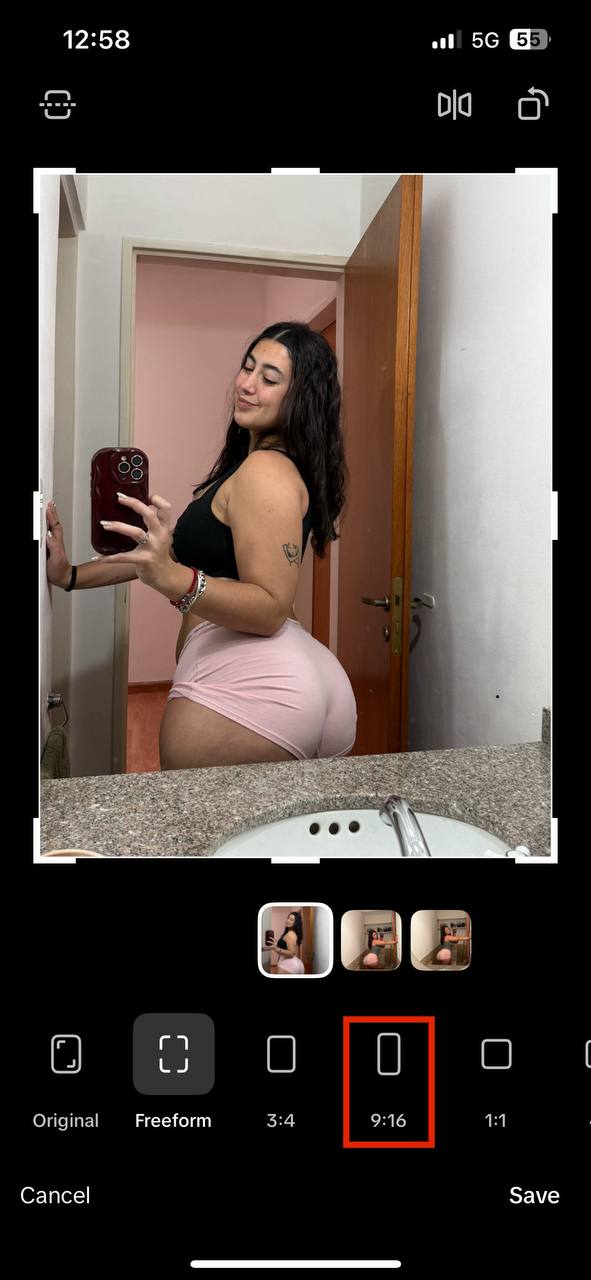
Step 3 — Center the Important Part
Drag the frame so the main subject (face, body) sits centered. Don't cut off the important bits.
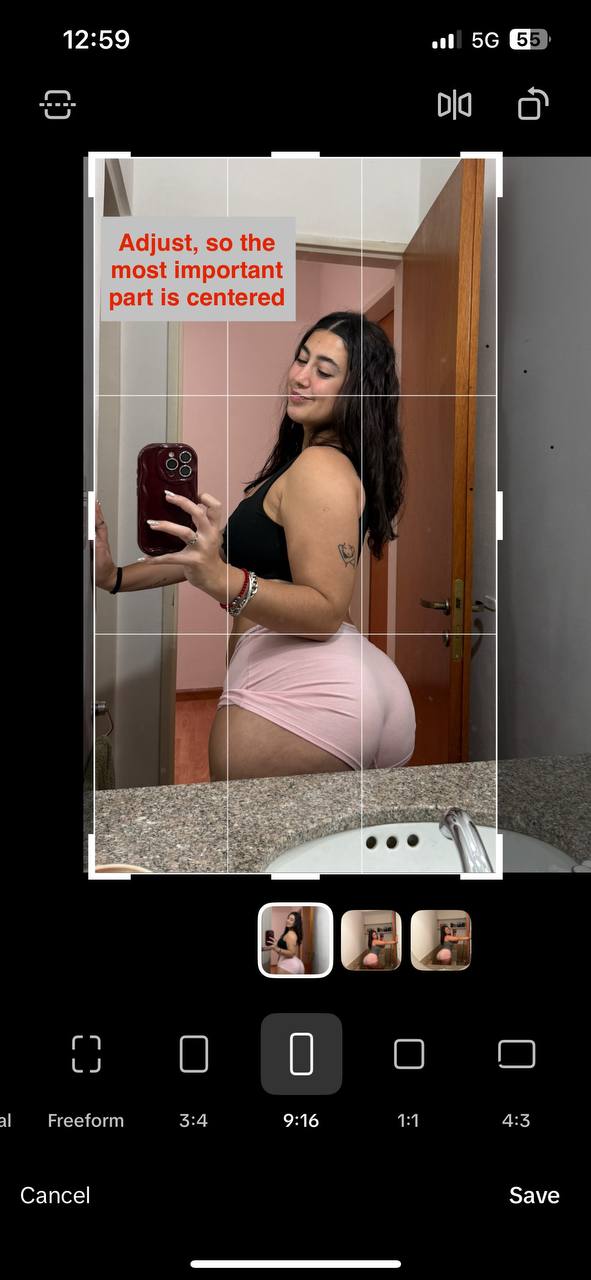
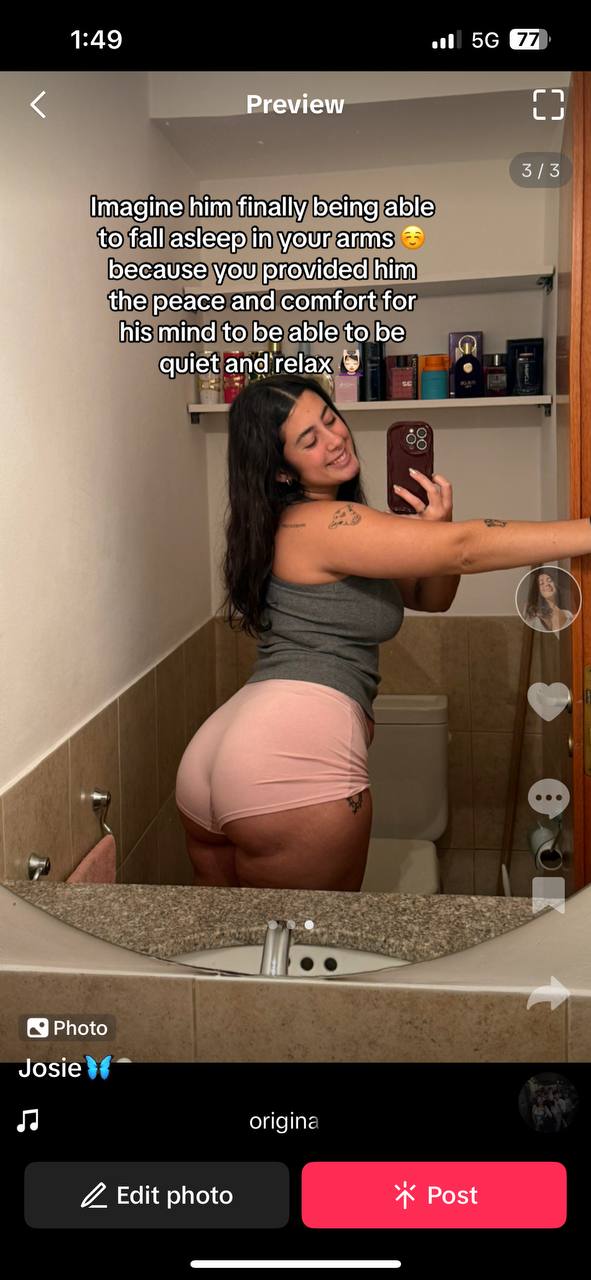
💫 Caption & On-Image Text Creativity
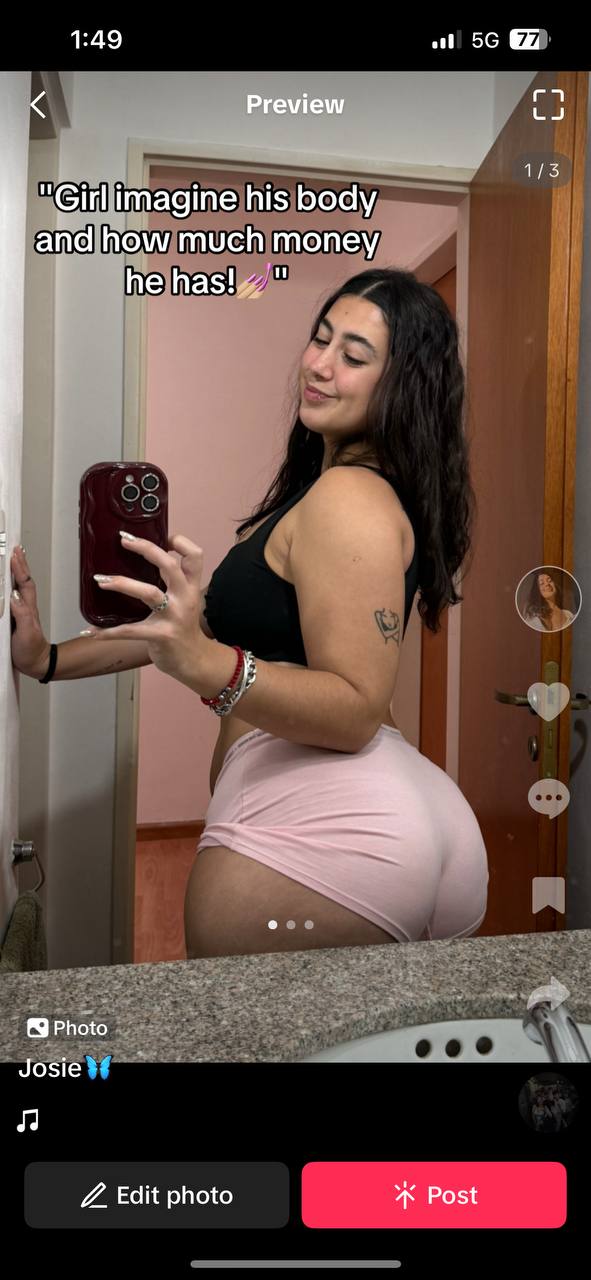
Stop copy-pasting the same caption on every post. Tweak the wording so it actually fits the image, add small well-placed emojis, and make it feel like the creator wrote it herself on the couch — not a bot on autopilot.
When the viewer sees a caption that clearly matches what's in the photo, it feels more alive and personal. That builds trust. Low-effort recycled text with mismatched photos kills engagement fast — it screams "automation".
- Adjust the wording so it ties into what the viewer actually sees on the image.
- Drop in 1–2 small emojis that match the vibe (💅, 😌, 🥺, 🦋). Don't spam emojis.
- Use quotation marks or short lines to make the caption feel like inner-thought / dialogue when it fits.
- Take 30 seconds extra per post to rewrite — you'll see the engagement difference.
Examples — Caption Matches the Image
📝 Make Your Slideshows More Unique
Most of you are copy-pasting slideshow texts one-to-one, maybe adding a few emojis or changing punctuation. To stand out long term, the viewer must feel like they are seeing this type of slideshow for the first time. This increases curiosity and watchtime.
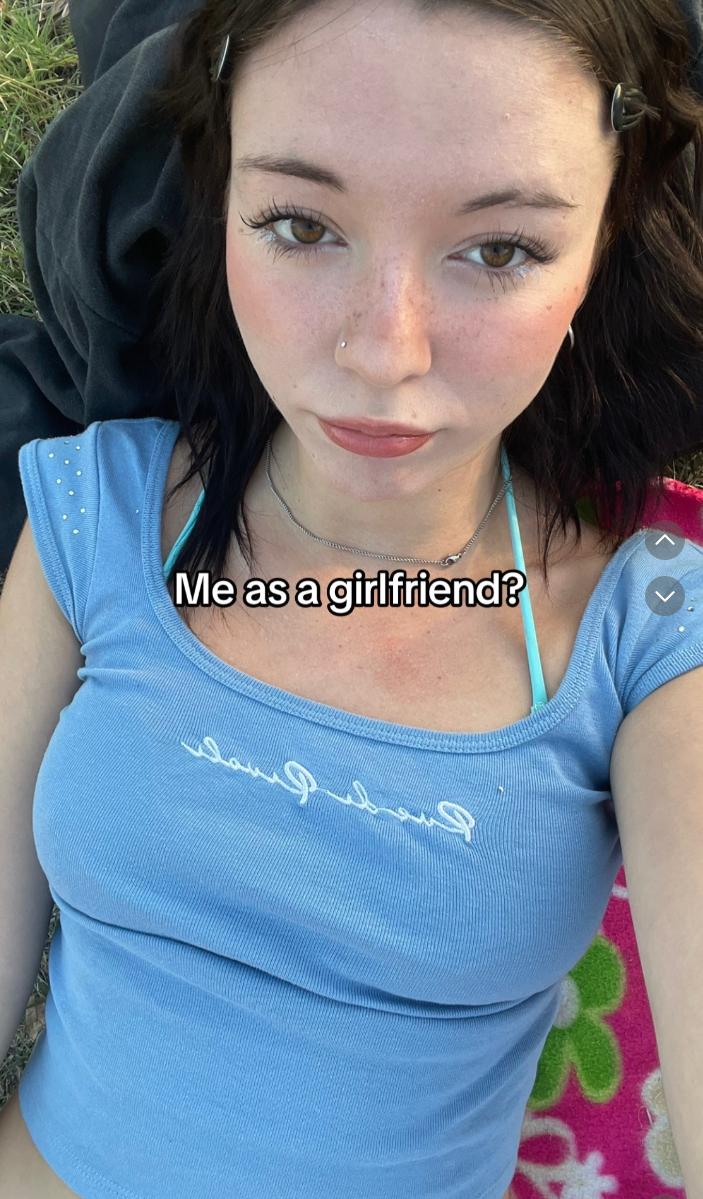
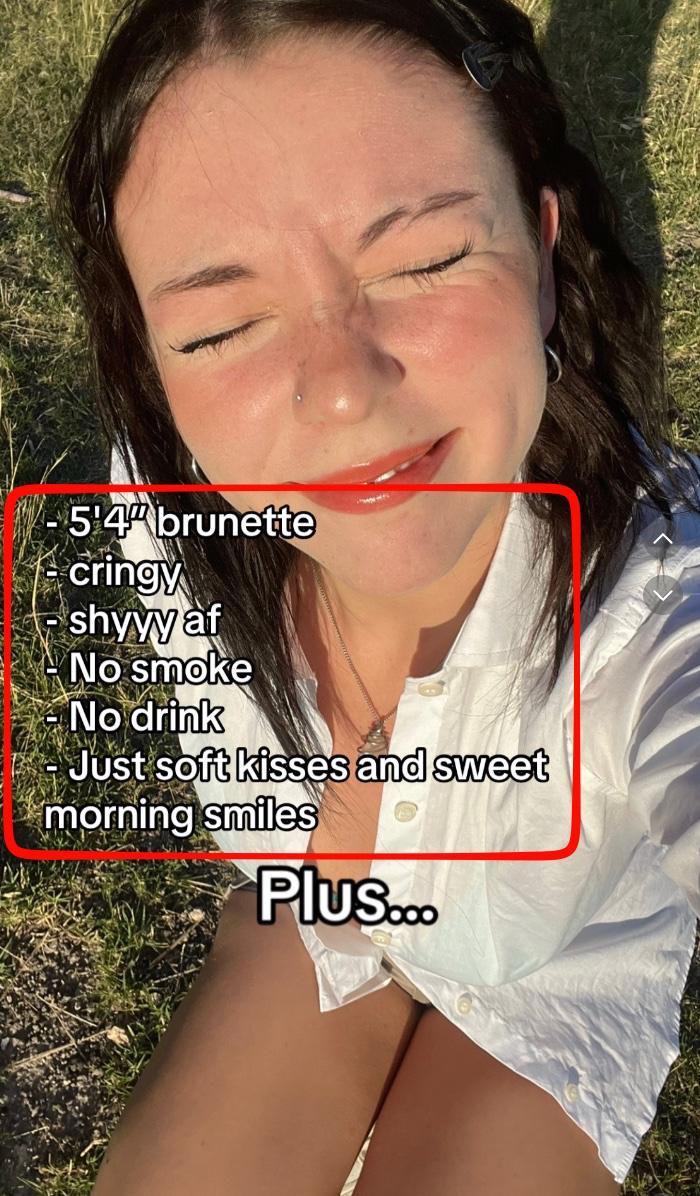
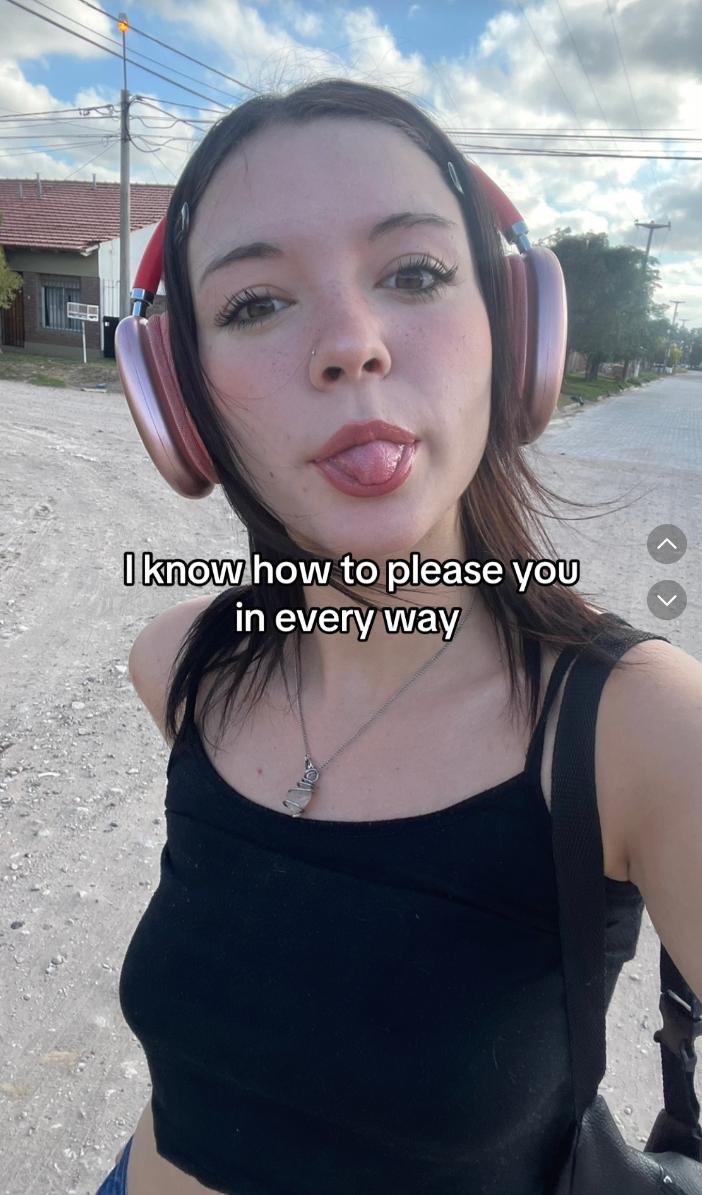
🎭 Match Details to Your Creator's Appearance
Adapt texts to your creator whenever possible. Why this matters:
- Your slideshow becomes more unique
- It feels more personal
- It does not look bot-made
- You highlight the creator's traits, which turns viewers into subscribers
- Your account stands out from the competition
🧑🎤 Know Your Creator
Before you rewrite any slideshow, know the 3–5 defining traits of your creator. Write them down once, keep them in a note on your phone, and check every adapted slideshow against this list.
- Age / vibe — e.g. "early 20s college girl" or "late 20s baddie"
- Look — hair color, height, body type (only what's clearly visible)
- Personality — cute / shy / flirty / dominant / goth / soft-girl
- Aesthetic — clean girl / alt / country / gym / dark academia
- Signature detail — one thing that shows up often (tattoos, piercings, specific style)
If you are unsure about any detail, ask your supervisor before posting.
✍️ Rewrite Text While Keeping the Meaning
A very underrated tool: simply adjust the text while keeping the original context. Why this matters:
- Viewer feels like they are seeing the slideshow for the first time → higher watchtime, more chance of going viral
- Lower shadowban risk — you are not copying texts 1:1
- Looks cleaner than randomly adding symbols or punctuation to dodge duplicate detection
For every text I give you, you'll rewrite the text while keeping the context.

Follow these rules strictly:
- Rewrite the text but keep the same context.
- It must NOT look robotic, perfect, generic, or overly clean.
- No hyphens.
- It can have small imperfections because that feels human.

Whenever I send you a text, reply with just the rewritten text.

Here's the first one:

[INSERT TEXT HERE]
💬 Add Details That Trigger Comments
To go viral, it is no longer enough to copy text + nice picture. You need to think about how your text can trigger comments. More comments = more interactions = TikTok pushes your slideshow.
Real examples from viral slideshows: the creator added one extreme or absurd detail (e.g. "15'3" tall", "54" brunette"). No one is actually that tall — so viewers jumped into the comments to react. Comment chain → algorithm boost.
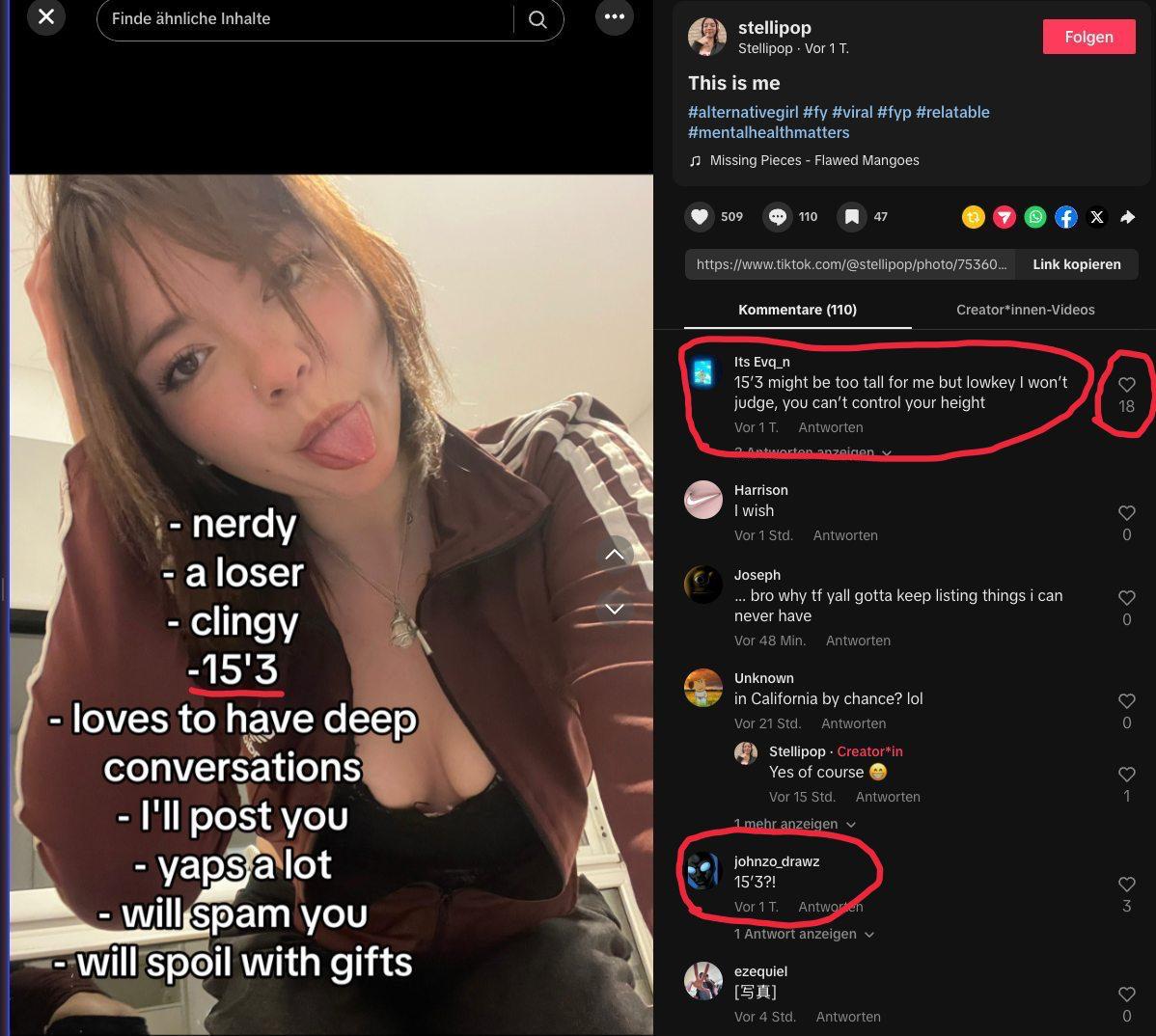
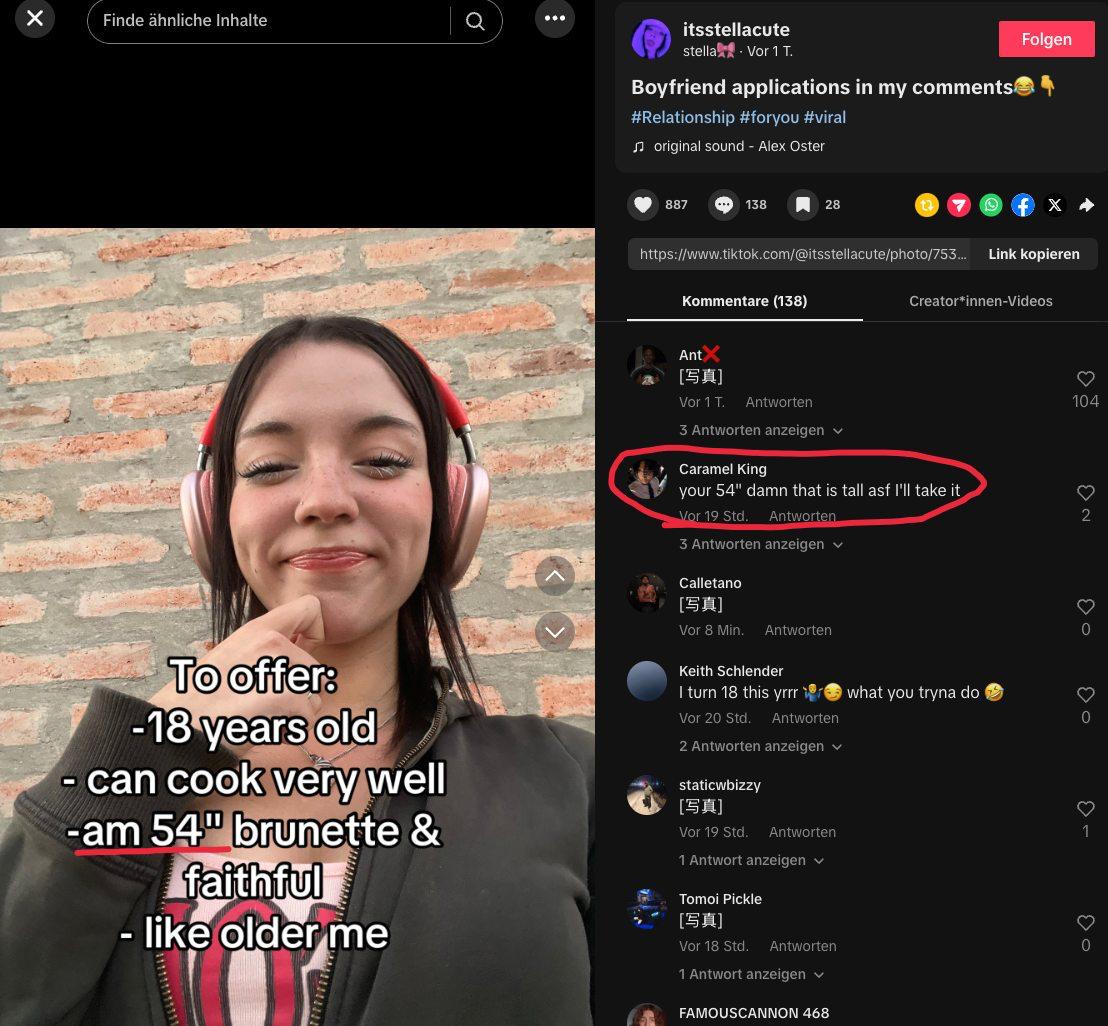
- Pick one detail that begs a reaction — extreme height, unusual age, weird specific fact.
- Keep the rest of the text completely normal so only that ONE thing pops.
- Track which triggers spark the most comments and lean into what works.
US Reach Optimization
- It does not help if a video gets 100,000 views but only 20% USA.
- That is like having only 20,000 real views for us.
- The numbers mean nothing without strong USA location.
- This is now the number one priority for every team member.
📊 Viral Channel — 70% US Location Rule
When you share a post in the viral channel, you must mark it based on the US location percentage. No exceptions.
🔒 Auto-Private Rule — Protect Your Account From Bad Locations
📺 FYP Training (Every Day)
You must spend 20 minutes every day training your For You Page. This teaches TikTok who your audience is.
Trucks, truckerlife, pickup trucks • BBQ, grilling, smoker • Golf, golfing, golf tips • Football, NFL, tailgating • Fishing, bass fishing • Gym, workout, lifting • Cars, muscle cars, car meets
These are just examples. The only thing that matters is the content is actually watched by men from the US.
👥 Following Strategy
✅ DO
- Pick creators from the Viral Posts tab that fit your creator's niche
- Follow US-based male accounts
- Only follow accounts you are 100% sure are from the US
- Maintain a balanced follower-to-following ratio
❌ DON'T
- Do NOT mass-follow accounts
- Do NOT follow non-US accounts
- Do NOT follow random or inactive accounts
🔎 How to Check if Someone is US-Based
✍️ Captions & Hashtags (Mandatory On Every Post)
- Keep captions short, natural, and engaging.
- Rotate caption styles: questions, statements, teases, reactions.
- Write in casual, American English.
- Add a soft call-to-action when possible (e.g., "what do you think?", "tag someone").
- NEVER copy the same caption when reposting. Always write a new one.
- Hashtags must fit the post. Every post has a specific vibe — your hashtags should match that exact vibe, not be generic.
- Use 3–5 hashtags per post. Rotate them — don't repeat the same set.
- Stop spamming #fyp / #foryou / #viral. These hurt the account more than they help. TikTok learned long ago that everyone stuffs these → they now barely carry signal and flag accounts as spam.
- If you don't know which hashtags to use, it is better to leave hashtags OUT than to fall back on #fyp. No hashtags > bad hashtags.
- Avoid sexual or flagged hashtags — those shadowban posts fast.
- Use the Hashtags tab in this tool to discover what's actually being used right now.
#️⃣ US-Focused Hashtag Examples
| Category | Example Hashtags |
|---|---|
| US Lifestyle | #pickuptruck #truckerlife #bbq #tailgate #countryliving |
| US Sports | #nfl #footballseason #golflife #fishing #fridaynightlights |
| US Culture | #usatiktok #americanmen #merica #usdating #americanvibes |
| US Location | #texaslife #californiagirl #nycvibes #floridaman #southerncharm |
| Niche (Alt/Goth) | #gothgirl #altvibes #darkaesthetic #altgirlusa #tattoogirl |
| Niche (Cute/Clean) | #softgirlvibes #casualconfidence #dailyvibes #cleangirlaesthetic |
| Content Type | #relatable #relationship #single #pov #storytime |
📈 Check Your Analytics
Sound Selection
Sound accounts for 20-30% of your reach. The right sound can make or break a post. Always use trending US sounds on your slideshows.
🎵 How to Find the Right Sound
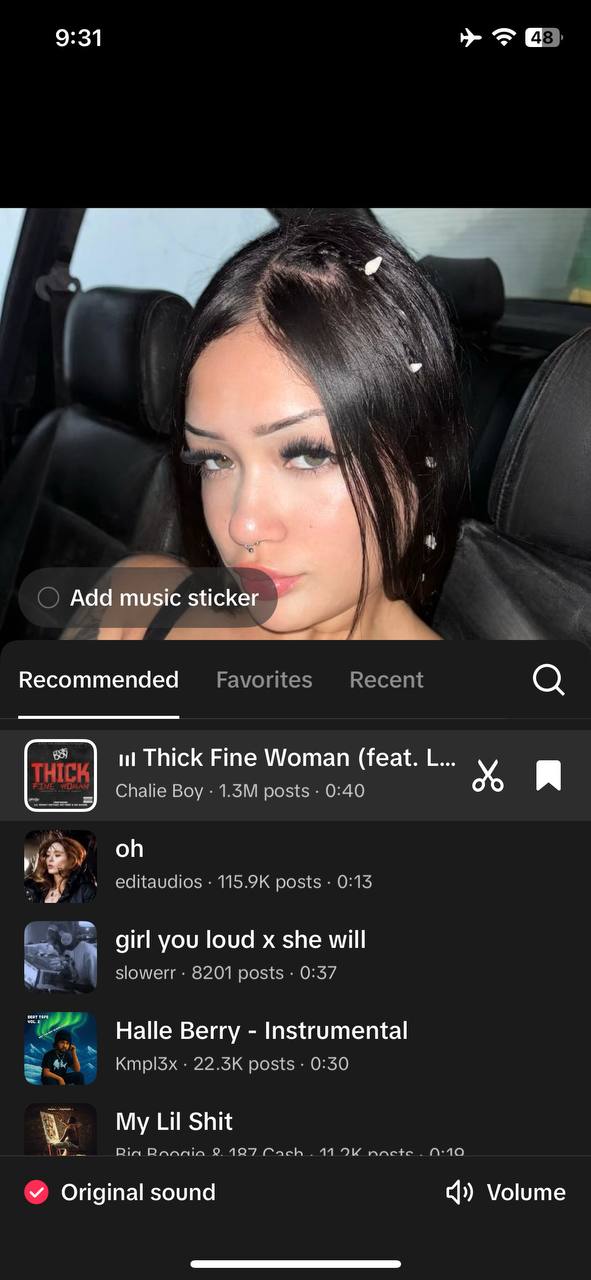
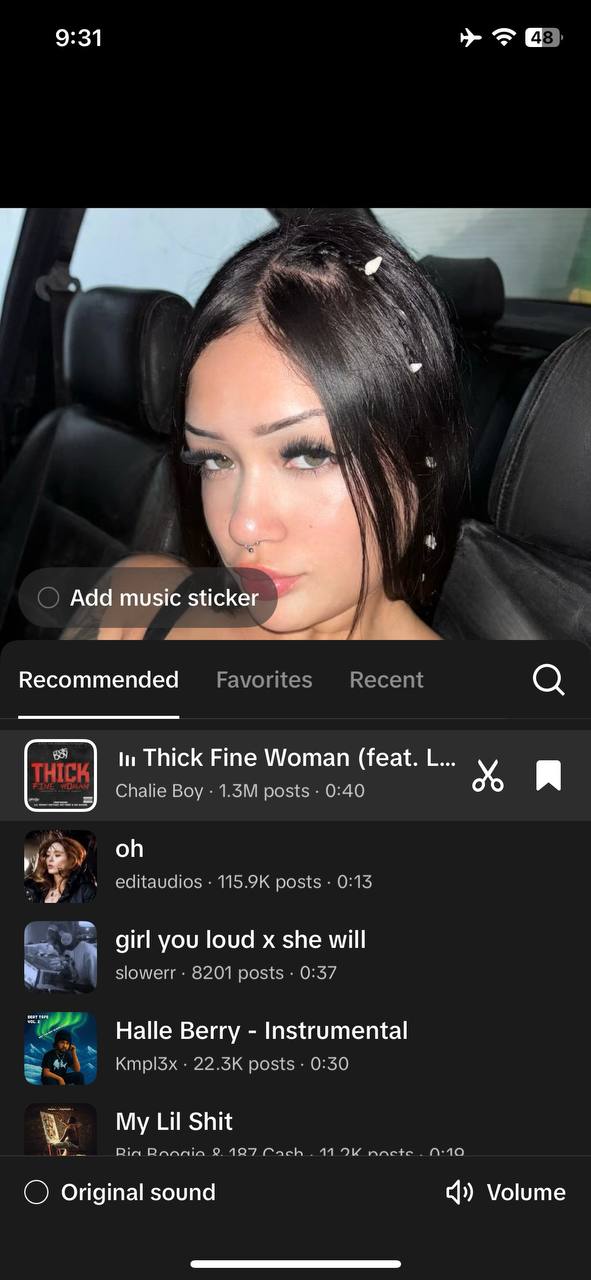
❗ TURN OFF the Original Sound (Video Posts) — SUPER IMPORTANT
Every time you use a video of your creator when posting on TikTok, you must turn off the original sound so it does not overlap with the sound you add to your post or story. This is one of the most common mistakes — do not skip it.
- Once the page is open, select United States as the country (top filter).
- Check the Popular tab → this shows sounds that already have heavy traction.
- Check the Breakout tab → this shows sounds that are rising fast right now. Best time to catch a trend before it peaks.
- Preview the sound, verify the top videos are US/English, then use it.
How to Use This Tool
🔥 Viral Posts Tab
Browse all viral slideshows from the accounts we track. This is where you get your daily content ideas.
🎵 Sounds Tab
Sound accounts for 20-30% of your reach. Browse Trending US Sounds and All Sounds by Usage to find the right fit.
⚡ Post Generator Tab
The Post Generator gives you a ready-made daily content plan from viral posts. It is a starting point — not a copy-paste tool.
- Check hair color — if the original says "brunettes" but your creator is blonde, change it
- Check personal details — names, ages, specific references must match your creator
- Change the wording — never copy text 1:1, always rephrase in your creator's style
- Use your own images — always use photos of your assigned creator, never the original images
- Verify the sound — check that the sound is still trending and fits your creator (see Section 9)
📋 Copy All Data Button
When viewing a post detail (click any post card), the "Copy All Data" button copies everything you need to recreate the slideshow: all slide texts, the caption, the sound name, and the TikTok link. Paste it into your notes and start adapting.
Engagement Strategy
How you engage with comments directly affects your reach. TikTok uses your interaction behavior to decide who sees your content next.
💬 Comment Reply Rules
New rule: only engage with foreign / external accounts. Don't follow our team's accounts. Don't like/comment on your colleagues' posts from your work accounts. Don't reply in their comments. Break the loop so TikTok learns who your REAL audience is (American men) instead of showing you the same team content all day.
✏️ How to Write Good Replies
Your replies must create conversation loops. The goal is to make the commenter reply AGAIN.
✅ DO
- Ask a follow-up question in your reply
- Flip the comment into curiosity (e.g., "is that meant as a flirt?")
- Keep replies short, flirty, and playful
- Use the creator's voice — casual, early-20s American girl
❌ DON'T
- Do NOT end conversations with one-word answers ("thanks", "yes")
- Do NOT use emoji-only replies
- Do NOT write replies that look obviously AI-generated
- Do NOT write long paragraphs as replies
- Claude (by Anthropic) is my recommendation — in most cases it gives more accurate, human-sounding replies.
- ChatGPT also works fine. Use whichever you prefer.
- Download Claude on iOS: App Store Link
- Always check every AI reply before posting — no matter which AI you use.
- The viewer must NEVER be able to tell it was AI-generated. If it sounds too perfect, too formal, too polite, or too long → rewrite it in your own words.
- If a viewer can tell it is AI = it is too AI. Fix it.
✍️ The Comment Reply Prompt — 2 Versions
Pick the version that matches how you're sending the comment to the AI. The screenshot version is easier because you just take a screenshot of the comment + slideshow and paste both in.
Version 1 — Text Copy/Paste
Use this when you copy the slideshow text and the comment as text.
Version 2 — Screenshot (Easier)
Use this when you just screenshot the comment + slideshow and send the image to the AI. Way faster than typing everything out.
💬 Reply Examples
| Comment | Bad Reply ❌ | Good Reply ✅ |
|---|---|---|
| "You are so beautiful" | "Thank you!" | "haha ty! where are you from? 😇" |
| "This hit different" | "I know right" | "did that warm up your heart? ❤️🔥" |
| "I need a girl like you" | "Aww thanks" | "is that meant as a flirt? 😆" |
| "Facts" | "Right" | "what part resonated with you the most?" |
🎬 GIF Strategy
🌍 Non-US Comment Handling
Only engage with US-based accounts (and sometimes Canada, UK, Australia, New Zealand). If a comment is clearly from a non-US user (non-English language, foreign bio), skip it. Unfollow non-US accounts. Remove non-US followers when possible.
Technical Hygiene
These technical tasks protect your accounts and keep them healthy. Do them on time, every time.
🔒 Shadowrocket / Proxy
- Every single time. No exceptions.
- Check whatismyipaddress.com — it MUST show USA before you open TikTok.
- If Shadowrocket is not working, use NordVPN as backup (connect to US).
- Do NOT use any social media apps until your proxy is working.
🗓️ Weekly Cache Clear (Every Sunday)
📍 Remove Image Location Data (VERY IMPORTANT)
TikTok can read image metadata and see where pictures were taken. You must remove location from all images before posting.
- Open the image in your gallery.
- Swipe up to see details.
- Tap the location.
- Press edit.
- Remove location — OR set a US location instead.
- Select all images.
- Tap the three dots (top right).
- Remove location from all selected images.
📲 App Updates
Shadowban Detection
TikTok does not officially use the term "shadowban." They refer to it as limited "For You feed eligibility." In practice it means your videos stop reaching new people without being officially deleted or struck.
- Sudden drop to under 100 views.
- Almost no FYP impressions.
- Reach limited to existing followers only.
⚠️ Common Reasons You Get Limited
- Nudity
- Sexual content
- Suggestive poses
Bikini images are allowed.
- Same hashtags on every post
- Same pictures on every post
- Same text on every post
- Copy-pasting slideshows without any changes
- Mass following
- Copy-paste comments
🛡️ Before Every Post — Ask Yourself
- Does this picture violate guidelines around nudity?
- Is the slideshow text original and not copy-pasted?
- Am I using 3 to 5 different USA hashtags?
- Am I using the same pictures all the time?
🔍 How to Detect a Shadowban
🔧 What to Do
🛡️ How to Avoid Shadowbans
✅ DO
- Follow the warm-up process for every new account
- Start with safe content on new accounts
- Wait 5–10 minutes between posts (never spam-post)
- Use niche hashtags, not spam hashtags
- Always have Shadowrocket connected
- Clear cache weekly
- Complete your profile fully
❌ DON'T
- Do NOT post revealing content on new accounts
- Do NOT spam-post (uploading all slideshows at once)
- Do NOT interact with your own other accounts
- Do NOT copy-paste the same hashtags on every post
- Do NOT use spammy hashtags exclusively (#fyp, #foryou, #viral)
What Works Best (Our Data)
Based on our tracked data, these content types consistently perform the best with our target audience (US men):
💬 Relatable Quotes
Quotes about friendship, loyalty, and "the little things." Lists of relationship expectations get massive shares because people tag their friends.
🤝 "Us vs the Situation"
"If I have $40 and you have $10, WE have $50." Content about standing together through hard times hits hard with the US male audience.
📋 Relationship Advice Lists
Numbered lists like "10 things men don't understand about women" or "5 green flags in a relationship." Easy to swipe through, easy to save and share.
📍 State / Location CTAs
"Drop your state 👇" or "Where you at? 🇺🇸" — These trigger US comments which directly boost your USA audience percentage in analytics.
Your First Week
Follow this schedule exactly for your first week with a new account.
| Day | What To Do |
|---|---|
| Day 1 | Create account. Fill profile (photo, bio, username). Warm up: scroll 15–30 min, like US content, follow 5–10 US accounts. Post 1 story. Do NOT post slideshows yet. |
| Day 2 | Start Testing Phase. Post 5 slideshows (5 min gaps). Use safe content only. Check eligibility after 15–30 min. Post stories. FYP training 20 min. |
| Day 3 | Continue Testing. Post 5 slideshows (5 min gaps). Check eligibility. Delete any not-eligible posts (do not appeal — risky). Post stories. FYP training 20 min. |
| Day 4 | Last testing day. Post 5 slideshows. Check eligibility. Evaluate: is this a winner or a bad account? Post stories. FYP training 20 min. |
| Day 5 | Switch to normal posting: 3 slideshows per day. Continue eligibility checks. Engage with US comments (max 20 per video per day). Post stories. FYP training 20 min. |
| Day 6 | Normal posting. Focus on US engagement. Check analytics. Follow more US accounts. Post stories. FYP training 20 min. |
| Day 7 (Sun) | Normal posting. Clear TikTok cache. Check all analytics. Clean up: delete not-eligible posts, make low-USA% posts private. Post stories. |
Common Mistakes
These mistakes will destroy your accounts. Read them carefully and avoid them.
Troubleshooting
⛔ Account gets banned right after creation
- Contact your supervisor and describe what happened.
- Your supervisor will guide you through the checks — there are several things to test before going to a phone reset.
- Verify Shadowrocket was ON and showing US before account creation.
- Only reset the phone if your supervisor confirms it is needed.
⛔ Posts consistently get "not eligible"
- Keep posting — do NOT stop posting. Slowing down for 1–2 days only feeds the problem.
- Delete all not-eligible posts (appeals are risky — see Section 6).
- Switch to safe content for your next few posts (no revealing material).
- Clear TikTok cache and restart the app.
- Report to your supervisor with details so they can track patterns.
⛔ Views are very low on all posts
- Check your traffic source in Analytics. If only "Personal Profile" = shadowban.
- Check your proxy: go to whatismyipaddress.com — must show USA.
- Check if image location data was removed.
- Make sure you are posting during US hours (5 AM – 1 PM PH).
- Try using different sounds that are trending in the US.
⛔ US percentage is low
- Increase FYP training: spend 20 min daily watching US content.
- Only reply to US-based comments.
- Follow more US-based male accounts.
- Use US-focused hashtags on every post.
- Remove or unfollow non-US accounts.
- Make posts with low USA% private.
- Check that your proxy is connected to USA.
⛔ Cannot create new accounts
- Make sure Shadowrocket is ON and showing US before trying again.
- If you keep getting blocked from creating accounts, contact your supervisor.
- Your supervisor will help you identify the issue — don't keep retrying blindly.
- Only reset the phone if your supervisor tells you to.
Quick Reference Checklist & Cheat Sheet
✅ Account Setup
🔥 Warm-Up Complete
📋 Before Every Post
📱 After Every Post
📅 Daily Operations
📋 Cheat Sheet
| Rule | Details |
|---|---|
| Accounts | 5 TikTok accounts per team member |
| Posting (Testing) | 5 slideshows/day for 3 days (5 min gaps) |
| Posting (Normal) | 3 slideshows/day per account (5–10 min gaps) |
| Posting Window | 5 AM – 1 PM PH Time |
| Stories | Post daily on ALL accounts (simple photos) |
| Eligibility Check | Check every post after 15–30 min |
| <200 views + not eligible | Delete immediately |
| >200 views + not eligible | Appeal. Approved = keep, Denied = delete |
| Shadowban Signs | Most posts under 100 views, only Personal Profile traffic |
| Post Limit | Max 50–60 posts per profile |
| Hashtags | 3–5 per post, mix niche + US-targeted |
| Comments | Max 20 replies per video per day, US only, first 3 days |
| FYP Training | 20 minutes daily, US male content |
| Cache Clear | Every Sunday |
| Image Location | Remove or set US location before posting |
| Proxy | Shadowrocket ON before opening TikTok. Always. |
| Low USA% posts | Make PRIVATE, do NOT delete |
| Winner Account | 200+ views, For You traffic, 90%+ USA |
| Bad Account | Under 100 views, not eligible, no growth = replace |
| DMs | NEVER respond. Zero exceptions. |
| Problems? | Ask the supervisor FIRST. |
Sorted by how often each hashtag is used by viral posts. Pick tags that fit your post — don't copy all of them. Generic tags like #fyp / #viral are hidden on purpose: they hurt your account.
Slide 1 texts from most shared viral posts — copy and adapt.
Paste TikTok usernames or profile links below. One per line, comma-separated, or mixed. Links will be auto-extracted.
| # | Account | Model | Followers | Total Posts | Viral | Max Views | Total Views | Status |
|---|
Generate your daily posts. Select how many accounts + time period, then review and approve.
How many of your TikTok accounts you want posts for.
How recent the viral posts should be. 30 Days = fresh trends (recommended). All Time = also pulls in older classics.